Configuring BARS for EuroScope
This guide includes a conceptual introduction to the BARS system, the model used by the EuroScope client, and the process of administering aerodrome data via the BARS for EuroScope editor. It is aimed at division staff configuring the BARS plugin for their aerodromes, as well as prospective contributors and others desiring a technical understanding of the plugin internals.BARS Overview
BARS is a system which permits controllers to control the appearance of variable scenery objects (invariably aerodrome ground lights) for pilots. BARS operates as a network separate from the main VATSIM network, similarly to other peripheral systems (like Audio for VATSIM). The BARS clients attach to the relevant VATSIM client – pilot clients for pilots, or EuroScope for controllers – and connect them to the central BARS servers. The servers are responsible for verifying the state of clients against the VATSIM servers, and conveying data between all connected clients.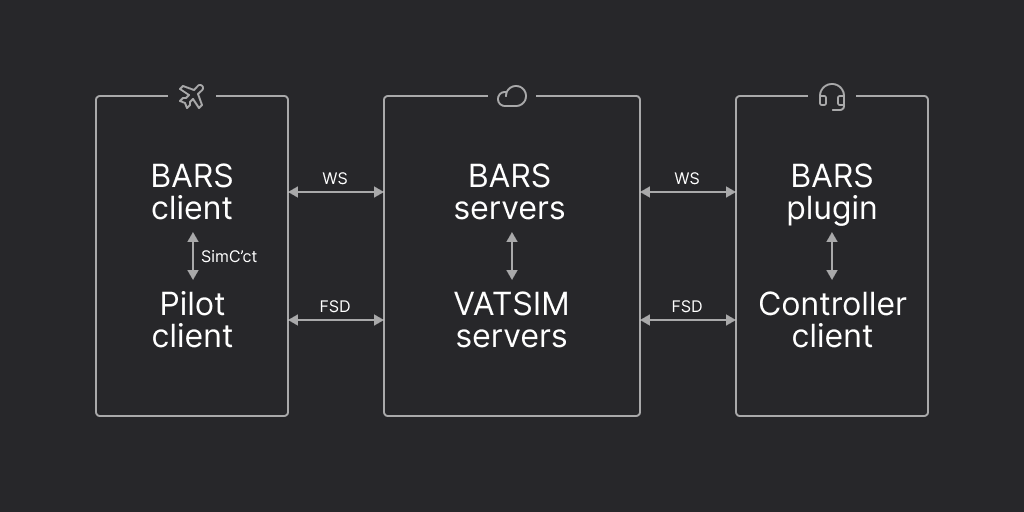
The addition of the EuroScope configuration increases this to three, but the first is directly associated with, and is edited alongside, the EuroScope configuration.
1
Canonical Object Data
The first is thce canonical object data. It consists of the approximate
geographic locations of the objects, and their basic properties: lighting
colour, directionality, etc. Each object is here assigned a unique BARS ID,
which starts with
BARS_. This data is defined by the nominated division
staff members for each aerodrome they wish to be added to the BARS network. Only
those division members with the requisite permissions are able to submit and
edit this data. For divisions using the EuroScope client, this data is edited
and submitted by using the EuroScope data editor.2
Scenery Position Data
The second is the scenery position data. This data derives from the
canonical data, but is specific to a given scenery for an aerodrome; thus,
whilst each aerodrome has only one set of canonical object data, it may have
many scenery position data sets, for each of the available scenery providers.
It specifies the actual displayed location of the objects (since this may vary
slightly between scenery providers), but not how they appear. This data is
provided by third-party contributors working from the canonical data.
The EuroScope Model
Due to the relative complexity of lighting systems used outside Australia, particularly of “follow-the-greens” selective lighting systems, the EuroScope client for BARS defines are more abstract model of lighting control which permits greater flexibility. Thus, a third data set is required: the Euroscope configuration.Graphs
Instead of having controllers set the state of lights directly, the EuroScope client keeps track of a lighting graph, which is edited by the controller. The state of individual lights is then computed based on the lighting graph. For example, if a controller wishes to lower a stopbar, the object displaying the red stopbar must be set to the off state, and the lead-on lights behind it must be set to the on state. Rather than treating these as separate actions, the EuroScope client considers the two lights to be controlled by one element of the lighting graph; so, when the controller changes the state of this element in the graph, both lights change accordingly as one operation.The “graph” in “lighting graph” refers to the mathematical sense and not that of a chart used for data visualisation.
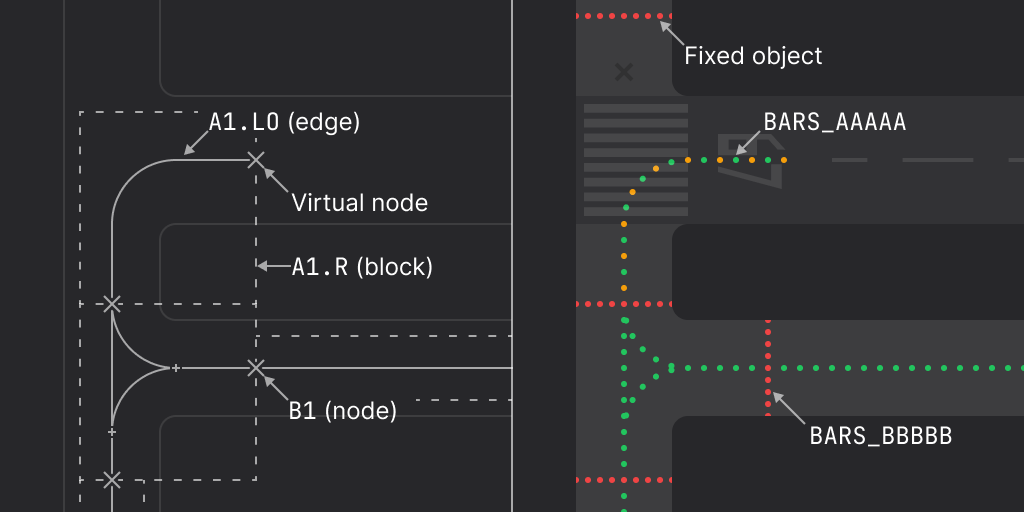
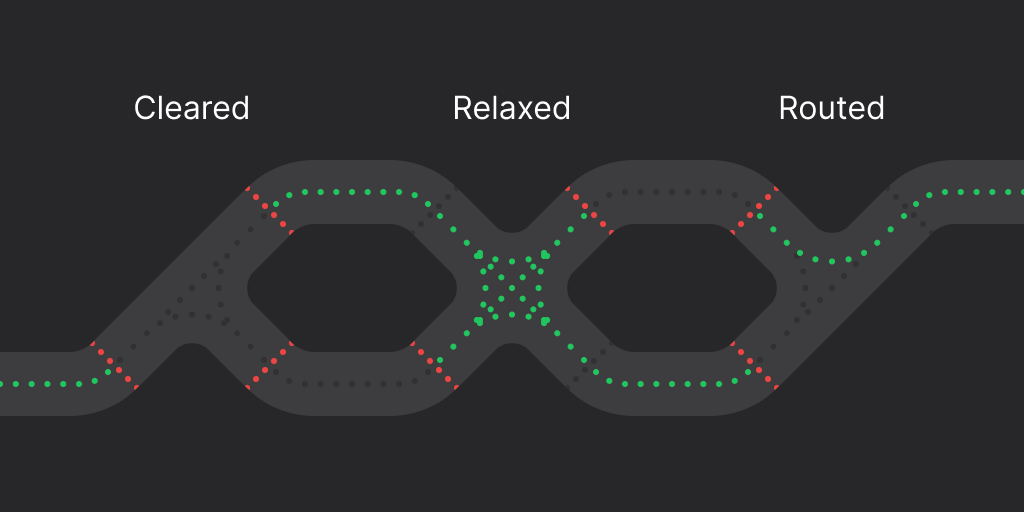
- cleared, where no route is set through the block and all centrelines are off;
- relaxed, where no specific route is set through the block, but all routes are enabled and all centrelines are on; and
- routed, where an ordered pair of nodes associated with the block are nominated as the start and end points of the route segment.
Profiles
Each aerodrome, in addition to its graph, is assigned one or more profiles. Profiles determine how the geometry of the graph is used to calculate the state of lights, and how controllers interact with the graph. Whilst they cannot change the shape of the graph itself, they can still significantly affect how the aerodrome lights function, with unlimited flexibility. Profiles can be used to define different modes of using the lights, such as a “daytime” mode with only runway stopbars in use, and a “low visibility” mode which enables FTGs. When BARS is in use at an aerodrome, only one profile is active at any time. If a controller changes the profile in use, this change is seen by all other controllers at the aerodrome. A profile is defined by a fixed identifier, and a human-readable name that the controller sees. Each profile contains the condition for every element in the aerodrome graph, and zero or more presets. Nodes can be in one of three conditions:- fixed sets the node to a fixed state of either on or off;
- direct makes the node directly settable by the controller, who can toggle it on or off by clicking it; and
- router indicates that the node should be used as a FTGs node, where setting the associated sticky attribute indiciates that the node must be clicked individually as part of a route, and can not be auto-routed through.
- fixed sets the edge to a fixed state of either on or off;
- direct makes the edge’s state the result of a Boolean expression of node states in disjunctive normal form; and
- router indicates that the edge should be used as a FTGs edge.
Router Mode
The router mode is the engine which powers the follow-the-greens logic. In theory, the router would construct routes between nodes by tracing routes along edges, and illuminating the shortest/best path. However, for various reasons, and in line with real-world systems, these routes are instead calculated in advance and “baked” into the configuration. Thus, when picking routes, the router ignores the actual edges in the aerodrome graph, and replaces them with edges defined by the blocks. The controller sets a route by clicking nodes in router mode in sequence. The router will attempt to find a route between the selected nodes, routing through multiple blocks if possible. This process can fail in two ways: if the route endpoints selected have multiple possible routes therebetween, the input is ambiguous and fails; if the required route through a block is not permitted by the block (typically as a result of taxiway geometry), or the two endpoints are otherwise disconnected in the taxiway network, the input is invalid and also fails. There exists some additional complexity when a stopbar at the border of a block is crossed by multiple centrelines. In this case, child nodes are created for each of the intersections at the node, which becomes known as the parent node. This is handled transparently in configuration, and is solved at runtime by the router.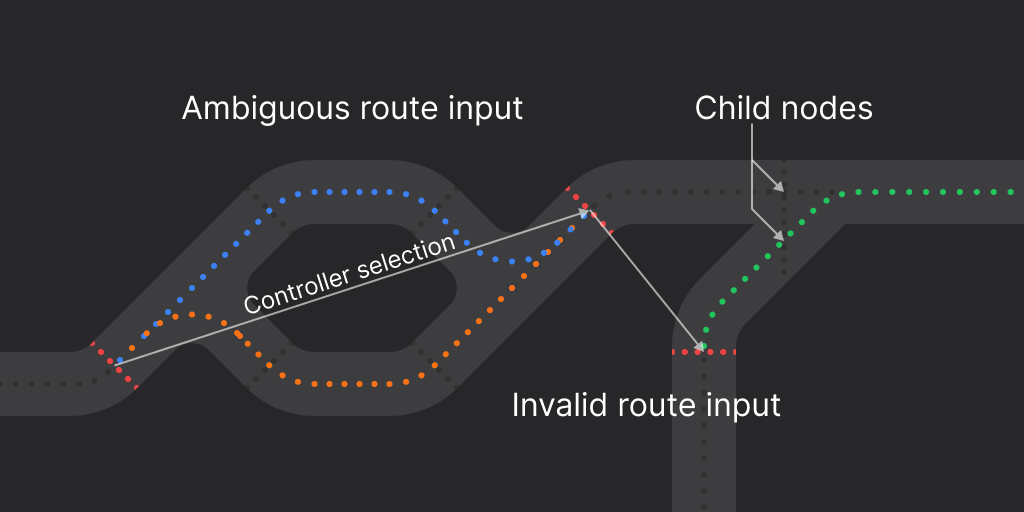
Maps
The maps define how elements (not objects) are shown to the controller. Each aerodrome can have one geographic map, defined in terms of geographic coordinates and drawn on the EuroScope radar (SMR), and zero or more standalone non-geographic maps, defined in Cartesian coordinates and drawn on a separate lighting panel. Non-geographic maps can define a background colour and base map consisting of static vectors. All maps then contain vector layers for nodes, edges, and blocks; for nodes, these layers are the off, on, and selected states, plus the hotspot polygon used to click the node; for edges, these layers are the off, on, and pending states; for blocks, this is the hotspot polygon used to click the block. All of these can be empty if the element should not be visible, or should not be interactable.It may be desirable in some cases for controllers to have a
“read-only” view of the aerodrome lights, particularly in the SMR view.
However, It is not necessary for divisions to configure maps with no targets
for this purpose, as the plugin provides this functionality natively.
The EuroScope Data Editor
The EuroScope data editor is the only recommended means by which divisions using the EuroScope plugin should configure it and edit their canonical object data. For guidance on using the editor, please see the tutorial video.
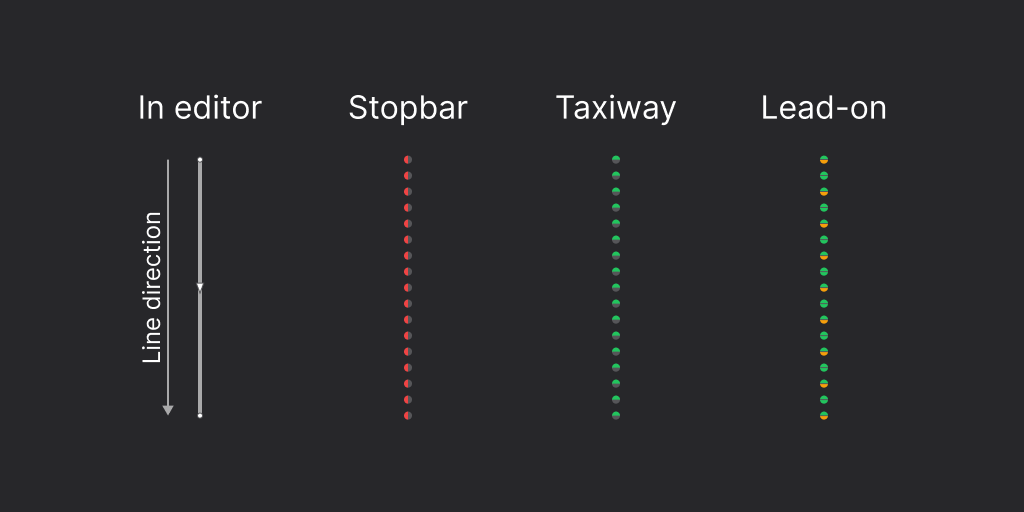
Note that unidirectional lights are generated based on the order of their
points when drawn.