
Prepare the Browser Test
Your draft loads automatically when you open the test page from the editor. You can also select or drag an existing contribution XML file up to 5 MB into the upload area.1
Choose the contribution draft
Use the draft from the editor, select another XML file, or drag one into the upload area.
2
Select Prepare test
BARS checks the draft and prepares the preview.
3
Inspect the preview
Check every object on the map before opening the contribution in the simulator.
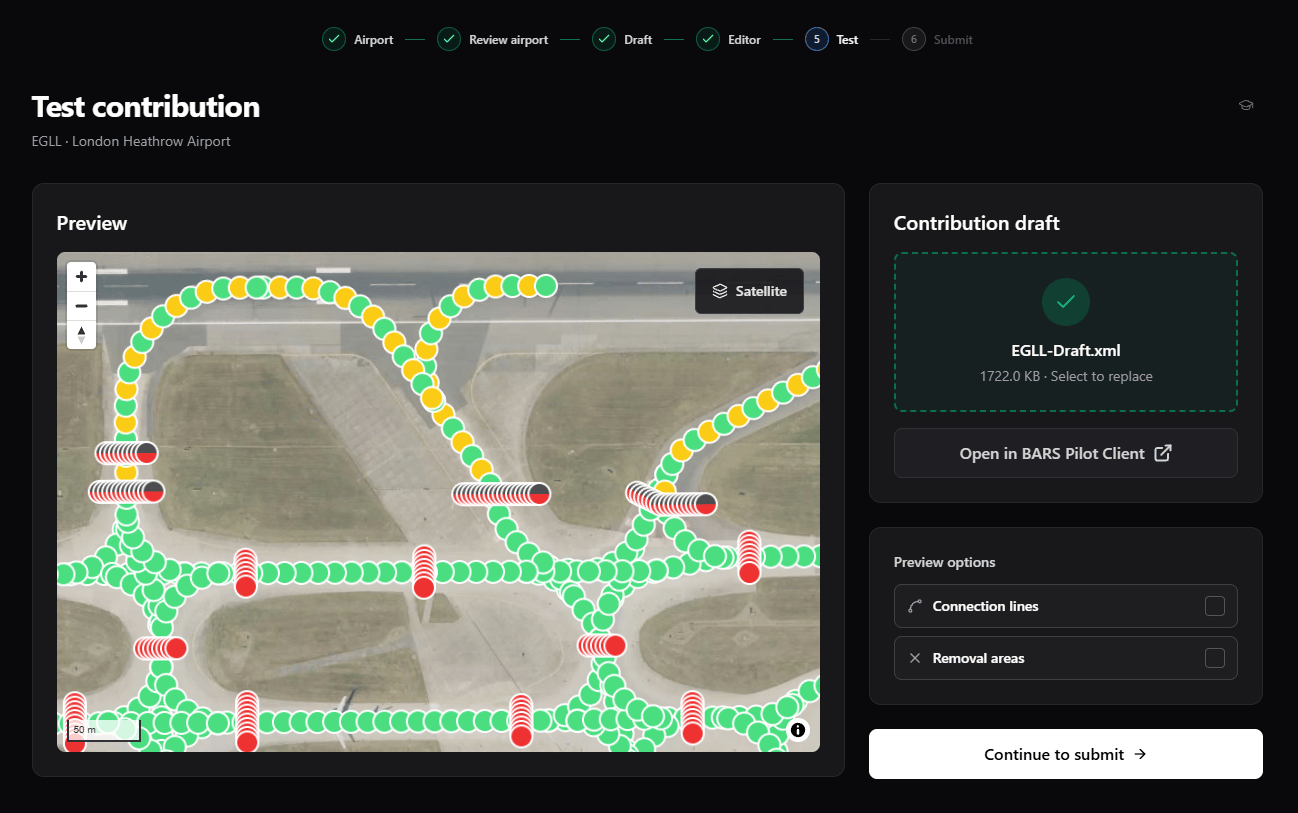
Preview Controls
Removal controls do not appear for X-Plane drafts.
Check for:
- Objects aligned with the intended taxiway, runway, and stand positions.
- The correct BARS ID and light type at each location.
- Complete lines with no accidental gaps or extra parts.
- MSFS removal coverage over the default lights that BARS replaces.
Test in the Simulator
1
Start the simulator
Load the supported simulator and spawn at the contribution airport.
2
Start the BARS Pilot Client
Confirm it is connected to the simulator before you continue.
3
Select Open in BARS Pilot Client
Allow the browser to open the Pilot Client if it asks. The Pilot Client enters Testing Mode and loads the prepared contribution.
4
Inspect every light
Testing Mode turns every submitted light on. Check position, spacing, direction, color, and duplicate default lighting from the cockpit and an external view.
5
Exit Testing Mode
Click the close button on the Pilot Client’s Testing Mode indicator when you finish.
Next Steps
Select Continue to submit only after the browser preview and in-simulator check are correct.Submission
Add the final scenery details and send the tested draft for review.